

Live by default
Lists are backed by Kubernetes watch streams, not polling - pod crashes, rollout progress and node pressure show up the moment they happen. You choose which types stay live per cluster.
Kubius talks straight to your cluster's API - no kubectl in the
loop. Every list is a live watch stream, so what you see is what's
happening right now.
No credit card · 14-day free trial
See it in action
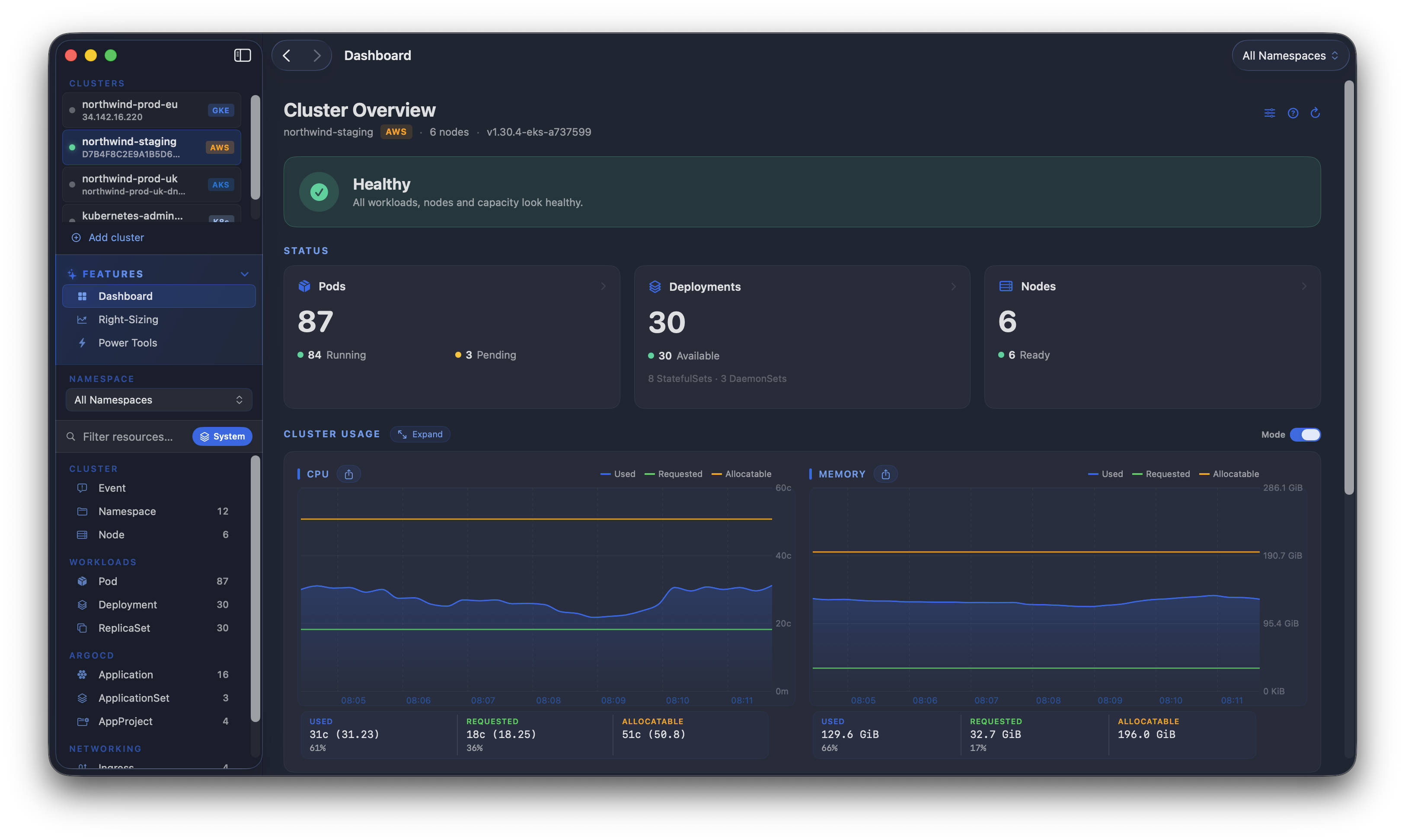
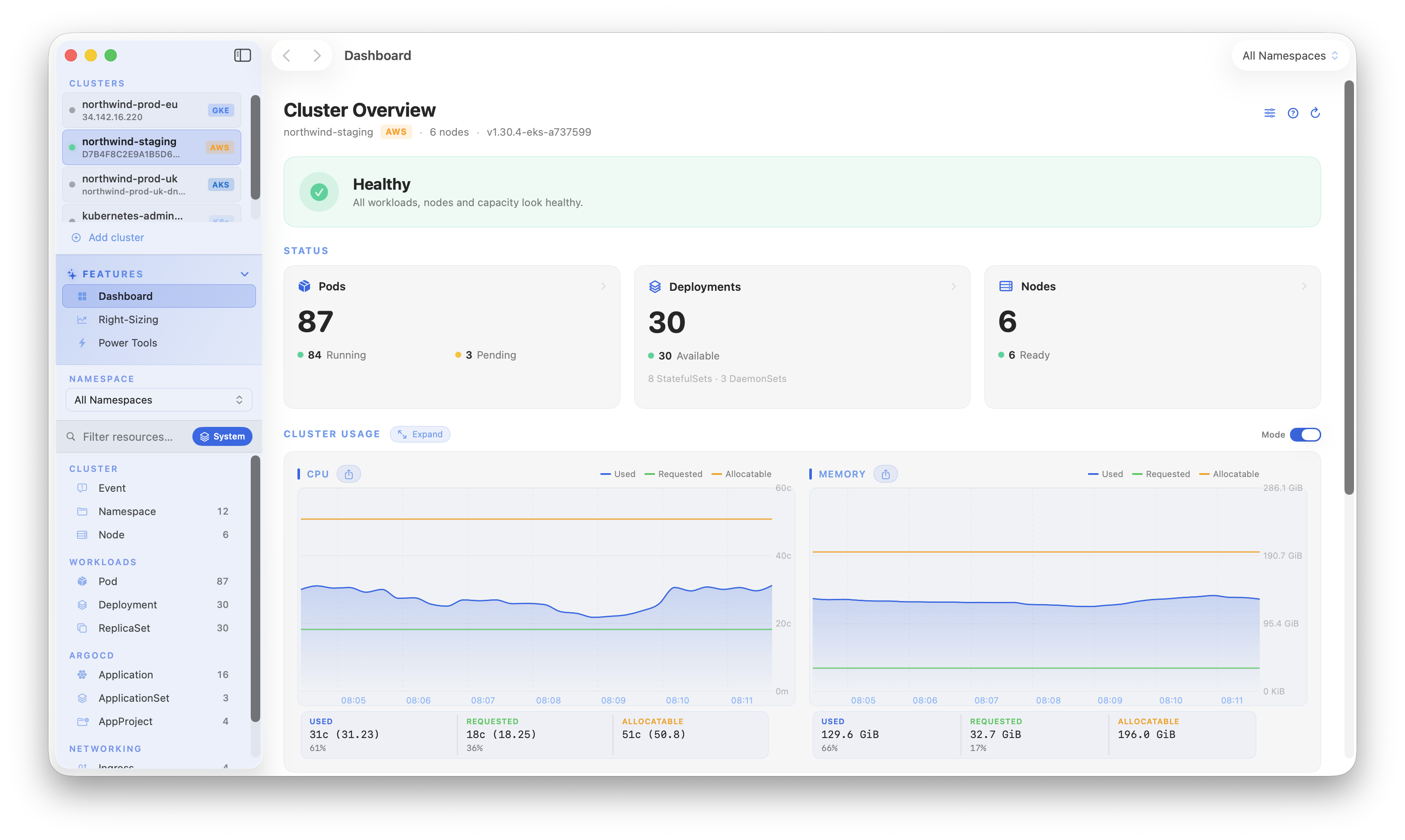
Live, not polled
Every list is a Kubernetes watch stream. Pods scheduling, rollouts rolling, a container crash-looping - it lands in Kubius the instant it happens. No refresh, no polling.
Live watch streams, right-sizing and safe node drains - powerful enough for production, simple enough for day one.
Lists are backed by Kubernetes watch streams, not polling - pod crashes, rollout progress and node pressure show up the moment they happen. You choose which types stay live per cluster.
Restart a workload, sample real CPU and memory across replicas, then apply recommended requests and limits - without leaving the app.
Cordon and evict with per-pod progress. PodDisruptionBudgets are respected, and a pod only flips to Evicted once it actually leaves the cluster.
Real SwiftUI, native windows and keyboard shortcuts. Open Google GKE, Amazon EKS, Azure AKS, DigitalOcean, self-managed and more clusters side by side, each fully isolated.
Everything you reach for to run Kubernetes day to day - in one native app.
| Capability | Kubius | kubectl + terminal | Browser dashboards |
|---|---|---|---|
| Native macOS app | Yes | Not applicable | No |
| Talks directly to the K8s API | Yes | Yes | Partial |
| Live watch streams, on by default | Yes | Partial | Partial |
| Metric charts with history | Yes | No | Yes |
| Right-sizing recommendations | Yes | No | No |
| Drain & delete with live progress | Yes | Partial | Partial |
| Native alerts for crashes & node pressure | Yes | No | Partial |
Trusted by engineers at insurance, fintech & SaaS teams.
“We knew there was a rogue workload, but couldn't easily see it on our AWS EKS cluster. Kubius quickly identified the issue. Very happy with this.”
“In our setup there are 250 pods running across 130 deployments in 10 nodes. The node diagnostics told the story. The Drain & Delete Node feature (in the app) made it stress free.”
Try Kubius free for 14 days with a verified email - no card required. Keep it with a one-time licence; free updates within the major version.
Standard, plus metrics & dashboards.
plus taxes, where applicable
Adds the metrics charts, right-sizing recommendations and cluster-wide dashboards.
Start free trialActivate on up to 3 Macs · 14-day free trial, no credit card
The full live Kubernetes client.
plus taxes, where applicable
Everything Kubius does, except metrics, right-sizing and cluster dashboards.
Start free trialActivate on up to 3 Macs · 14-day free trial, no credit card
Not sure which? Compare Standard & Pro feature by feature.
Nowhere but your cluster. Kubius reads your local kubeconfig and connects straight to the Kubernetes API over TLS - the same way kubectl does. No proxy, and no account required to connect.
No. Kubius talks directly to your cluster from your Mac, so your resources, logs, metrics and secrets only ever flow between your machine and your cluster - never through Kubius servers or any third party. The only thing that reaches us is your account and licence (your email); nothing about your clusters. Even the optional shared right-sizing history is stored encrypted inside your own cluster, never sent to us.
No. It's a one-time payment for a lifetime licence, with free updates within the major version. You can activate it on up to 3 of your Macs.
Any cluster in your kubeconfig - Google GKE, Amazon EKS, Azure AKS, DigitalOcean, self-managed and more. The app runs on macOS Sonoma (14) or later - Apple Silicon or Intel.
No. Kubius reads your kubeconfig and speaks the Kubernetes REST API directly - it never shells out to kubectl. What a cluster needs depends only on how it logs in:
Start a 14-day trial by verifying your email - no card required. When it ends you'll need a licence to keep using the app; your settings and saved state stay exactly where they were.
Still unsure? Ask us anything - a real person on the team replies.